Let me start off by saying your Google Business Profile is probably the most important metric for local SEO. If you want someone near you asking Google where they can find something you sell to tell them you sell it, then get your Google Business Profile right.
As boutique owners who already know the routine, there’s one tab for checking reviews, another for checking search traffic, and a third just to update your hours because of some event or the holidays… If you remember to.
It works, but it’s tedious. And most of you only log in when something breaks or holiday hours roll around. Why? Because you’re trying to run a boutique!
Google’s new Business Notebooks in Gemini completely changes that workflow. And it’s free!
Instead of clicking around a clunky dashboard, you connect your profile once to get a dedicated AI workspace. From a single chat window, you can ask for traffic insights, draft review replies, and actually push live updates to your profile just by typing what you need.
Unfortunately, I know a lot of you are going to forget how you first started your Google Business Profile and it may take some time getting in. Trust me, it happened to us.
Anyway, I spent some time testing it out this week to see if it’s actually worth your time. It is! Here is what stood out to me and how it can simplify how you run your store.
It catches the profile gaps you forgot about
Most boutique profiles have quiet holes. Maybe you never checked off “in-store pickup,” your holiday hours still reflect last year’s schedule, or your store photos are from two seasons ago.
Individually, these feel minor. Together, they are the difference between your shop showing up in “boutiques near me” or losing that foot traffic to the store down the street.
The notebook scans your profile and flags this stuff automatically: missing attributes, stale hours, or photos that need refreshing. It is essentially the local SEO audit you keep meaning to do, handled for you.
Review management gets a lot less painful
Two things stood out here:
- Trend Analysis: Gemini reads across all your reviews and flags patterns. If multiple shoppers mention that fitting room lines were slow during a weekend event, or if everyone raves about a specific collection, you’ll see it summarized instantly.
- Drafting Replies: It drafts responses in seconds—from a warm thank-you for a loyal customer to a calm, professional reply to a late-night complaint. You just review and hit send instead of staring at a blank box. Quick response times signal to Google (and prospective local shoppers) that your store is open, active, and attentive.
You can pull your own search data just by asking
This is the feature I think you will use most. Instead of digging through messy analytics dashboards, you simply ask in plain English:
- “What are the top search keywords driving shoppers to my profile this month?”
- “Summarize my direction requests and website clicks over the past 30 days.”
Then you put that data to work. If shoppers are finding you through queries like “designer dresses near me” or “game day apparel,” you know those exact phrases belong in your next update post, Q&A section, or featured product lists.
It actually makes the changes for you
This is the biggest shift. Older AI tools gave you advice and left the manual clicking to you. With Business Notebooks, you can tell Gemini: “Update my operating hours for this Sunday’s private shopping event” or “Schedule a post for our weekend floor markdowns,” and it updates your live profile directly. You never have to leave the chat.
How to set it up in 2 minutes
- Go to gemini.google.com signed in with the email tied to your verified Google Business Profile.
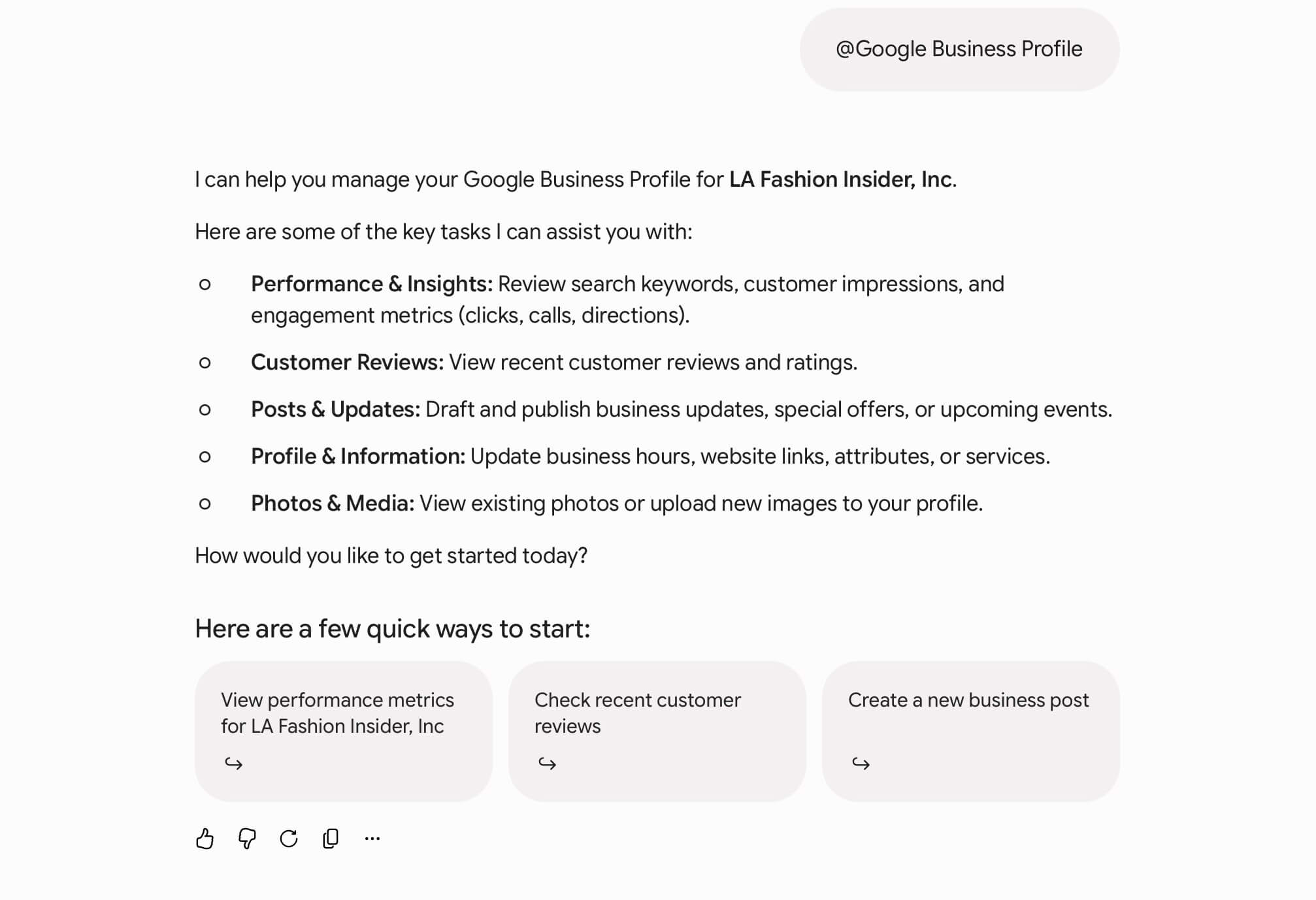
- Type @Google Business Profile in the prompt box and ask a question about your shop.
- Follow the quick prompt to connect your account. Your Business Notebook will generate automatically.
Prompts to copy and paste
Once you’re connected, copy and paste these directly into your notebook:
- “Audit my Business Profile and list the top five things I should update first.”
- “What attributes or details am I missing that other boutiques in my category use?”
- “Summarize the main feedback themes in my reviews from the last 90 days.”
- “Draft a polite reply to my most recent review, thanking them for shopping with us.”
- “What search terms brought local shoppers to my profile this month? Which ones am I missing in my posts?”
- “Write a Google post announcing our new seasonal arrivals using my top three search keywords.”
A few sneaky tricks I’ve learned
And by sneaky, I mean clever, underutilized strategies that leverage local charm, community roots, and smart digital optimization to outrank big-box retailers and national chains.
Here are 6 sneaky, high-impact local SEO growth hacks tailored specifically for our clients.
1. Leverage high-intent “style & event” secondary categories
In small and smallish towns (looking at you Nashville), fashion revolves heavily around key events—game days, gameday dresses, weddings, formals, and seasonal festivals.
The sneaky trick: Don’t settle for just “Women’s Clothing Store” as your profile category. Add specific secondary categories available on Google like “Boutique,” “Dress Shop,” “Fashion Accessories Store,” or “Bridal Shop.” Aligning your secondary categories with local seasonal spikes shifts your Map Pack visibility right when shoppers start searching for party or event attire.
2. Pre-seed event FAQs in Google Q&A
Shoppers search for specific dress codes, sizing, and shipping/pickup options for weekend events.
The sneaky trick: Don’t wait for shoppers to ask questions on your Google listing—populate the Q&A section yourself. Ask and answer questions using natural local search terms:
- “Do you carry gameday dresses and accessories in school colors?”
- “Do you offer local curbside pickup for last-minute weekend event outfits?”
Google indexes this conversational text for local Map Pack and voice search queries.
3. Weave neighborhood & regional charm into review replies
Getting 5-star reviews from loyal shoppers is great, but your replies can double as an invisible local ranking signal.
The sneaky trick: When responding to reviews, naturally include your city, neighborhood, or local style specialties. Example: “Thanks Y’all! We love being your go-to boutique for church dresses and Saturday night style in Downtown Charleston!” Google scans this reply text for entity context and local relevance.
4. Optimize photo filenames with local landmarks & style trends
Google uses AI vision and file metadata to understand what your business offers and where you’re located.
The sneaky trick: Before uploading photos of new arrivals, flat-lays, or store displays, ditch generic filenames like IMG_1024.jpg. Rename them with hyper-local context:
- birmingham-al-womens-boutique-fall-arrivals.jpg
- downtown-savannah-gameday-dresses-display.jpg
Consistently adding fresh photos signals an active, thriving storefront to Google’s ranking algorithm.
5. Create “town & gameday” micro-landing pages
If your boutique attracts shoppers from neighboring small towns, surrounding counties, or nearby college campuses, a single generic website homepage won’t catch all that search traffic.
The sneaky trick: Build dedicated micro-pages on your website targeting neighboring towns or university campuses (e.g., “Women’s Boutique near [Local University Name]” or “Boutique Shopping near [Neighboring Town/District]”). Highlight local parking details, nearby lunch spots, and event dress guides. Link these pages directly to your local profile services.
6. Clean up fake “keyword-stuffed” competitors
Big city e-commerce brands or pop-up shops sometimes create fake Google Maps listings with stuffed titles (like “Best Cheap Boutique Gameday Dresses Online LLC”) to hijack local map traffic.
The sneaky trick: Use the Suggest an Edit feature on Google Maps to report online-only operations or fake listings posing as physical storefronts. Clearing out non-compliant competitors directly opens up a spot for your legitimate brick-and-mortar storefront in the top 3 Map Pack results.
One honest note: It’s a brand-new feature, so double-check any live edits it makes to your profile for the first few weeks just to be safe. But if keeping up with Google Business Profile has been a chore you constantly put off, this is by far the easiest, lowest-friction way to keep your store visible.
And once Google starts sending more local shoppers through your door, make sure the racks are ready for them. That’s where our wholesale fashion buying services come in—and if you’re hunting for fresh labels, start with our directory of women’s wholesale clothing brands.
Let me know if you try it out. I’d love to hear how it works for your business!
Best,
Kenwood